Search the Dakidarts network
InsightThe Numerology APIAPIHealthHeFit APIAPIContentQuoteverseAPIFinanceCalcX Investment APIAPIFinanceCalcX Loan Calculator APIAPISearchSearch Query Autocomplete APIAPIHealthPregnancy Calculator APIAPIIdentityChecky — Verify Phone Number APIAPIIdentityChecky Email Verification APIAPILanguageLinguify Language Detector APIAPIDataCountries Info APIAPISecurityIP Reputation Checker APIAPISecurityMalware & Phishing URL Scanner APIAPISecurityDark Web Exposure APIAPISecurityEncryption & Hashing Utility APIAPISecurityDevice Fingerprint & Bot Detection APIAPISecuritySSL/TLS Security Analyzer APIAPISecurityFile Hash Analyzer APIAPISecuritySQL Injection / XSS Payload Detector APIAPISecurityNetwork Packet Threat Analyzer APIAPITimeEthiopian Calendar APIAPIDataCreator Sponsorship Intelligence APIAPICommerceE-commerce Product & Price Intelligence APIAPICompanyFrom API Catalog to Product Platform: The Dakidarts DirectionJournalProductGetting Started with Dakidarts Numerology WordPress PluginJournalResearchMirror Numbers and Cycles: Extensions in Numerological AnalysisJournalResearchHidden Passion Position Number & Gap ResonanceJournalBotHow to Use Quoteverse369bot on TelegramJournalEngineeringPHP 8.4 JIT in Real Workloads: Where It Helps — and Where It Does NotJournalAstrologyDecode the Cosmos: Why Horoscopes Still Matter in the Age of AIJournalAstrologyHoroscope ≠ Hype: Understanding the Real Power of Celestial PatternsJournalAstrologyYou're Not Just Your Sun Sign: How to Read a Full HoroscopeJournalAstrologyHow Horoscopes Sync With Numerology for Deeper Life GuidanceJournalAPIDecoding Words with Numbers: Using the Gematria API in Python for Hidden InsightsJournalAPIYour Celestial Blueprint: How to Generate a Full Birth Chart Using the Numerology APIJournalAstrologyYearly Horoscope Trends: What Each Sign Can Expect Spiritually & PracticallyJournalAstrologyRetrogrades & Romance: When to Reconnect or Release in LoveJournalAPIHow to Integrate the Dakidarts Numerology API into Your Website or Mobile AppJournalAPIWhat Is a Numerology API? A Practical Tool for Apps and Spiritual ProductsJournalEngineeringHow to Build a Telegram Bot Using PythonJournalLegalTerms of ServiceLegalLegalPrivacy PolicyLegalLegalAPI Terms of ServiceLegalLegalBilling, Credits & Subscription PolicyLegalLegalSecurity, Compliance & Cookie PolicyLegalLegalDisclaimer, Medical & Spiritual DisclaimerLegalProductHeFit APIHFProductNumerology APINUProductNumora StudioNSProductOpAstroOAProductNumerologyBotNBProductNumerology Core for WordPressWPProductNoteMeAppPageHomeSitePageAboutSitePageDeveloper API documentationSitePageJournalSitePageChangelogSitePageContactSitePageLegal & Trust CenterSitePageEcosystemSitePageEnterpriseSitePageAPI CatalogSitePageNumerology Core for WordPressSitePageSearchSitePageServicesSitePageShopSitePageSystem StatusSitePageNumora StudioSitePageSupportSitePageTrustSiteServiceWeb DevelopmentServiceServiceGraphics DesignServiceServiceDigital MarketingServiceServiceCloud ServicesServiceServiceSoftware DevelopmentServiceServiceAPI Development & IntegrationServiceServiceAI & AutomationServiceServiceTechnical SEOService
← Dakidarts ecosystem NOTEME / DESKTOP WRITING STUDIO

Think clearly.
Write deeply. Keep it local.

NoteMe is an open-source desktop app that pairs a fast Markdown notes workspace with Books Studio, a page-design surface for manuscripts. No account, no cloud dependency, no tracking — just your work on your machine.
Local SQLite storageNotes + Books StudioOpen source / MITmacOS / Windows / Linux
Latest releasev0.2.0
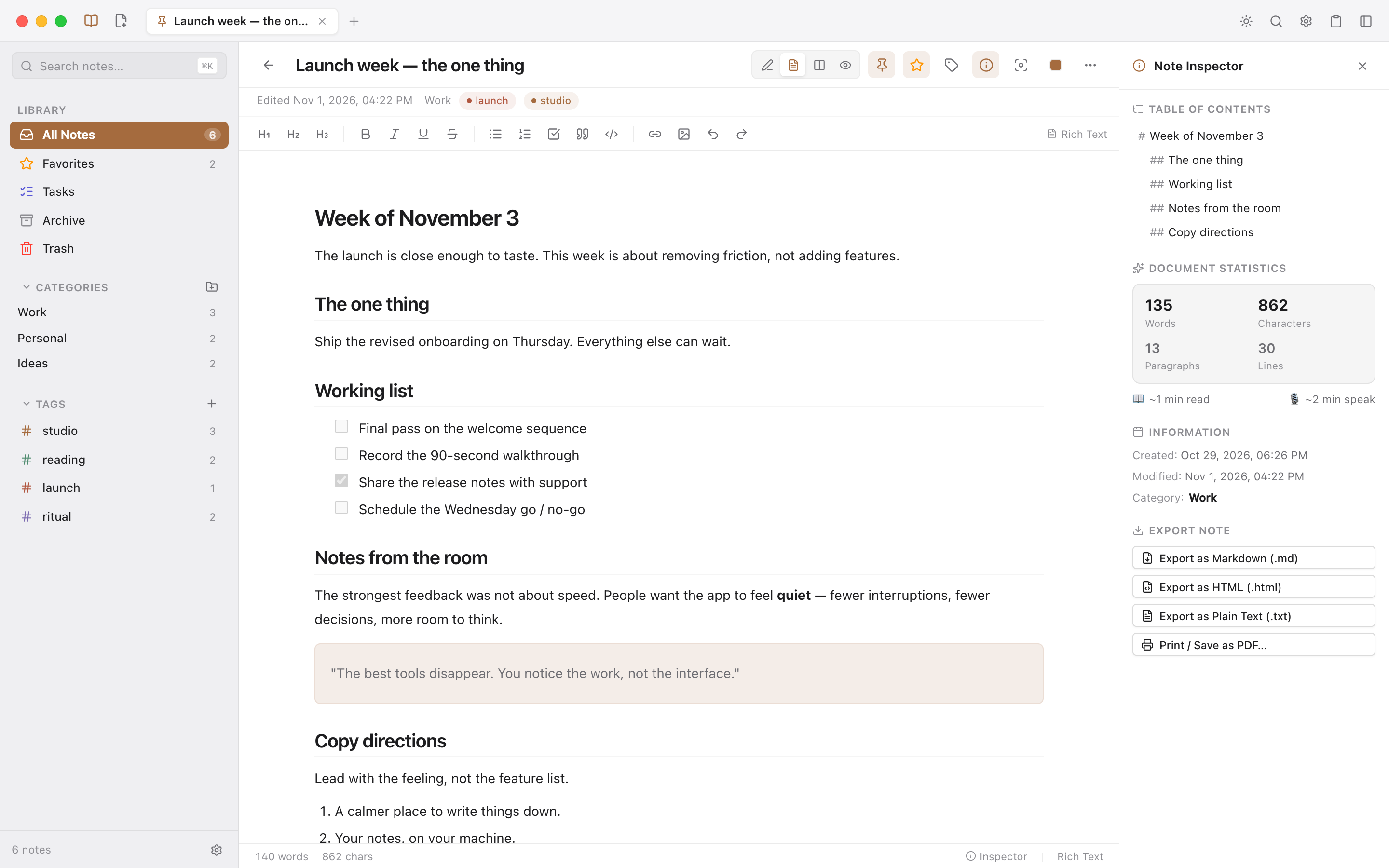
NoteMe notes workspace with tabs, categories, a rich text note and the document inspector.
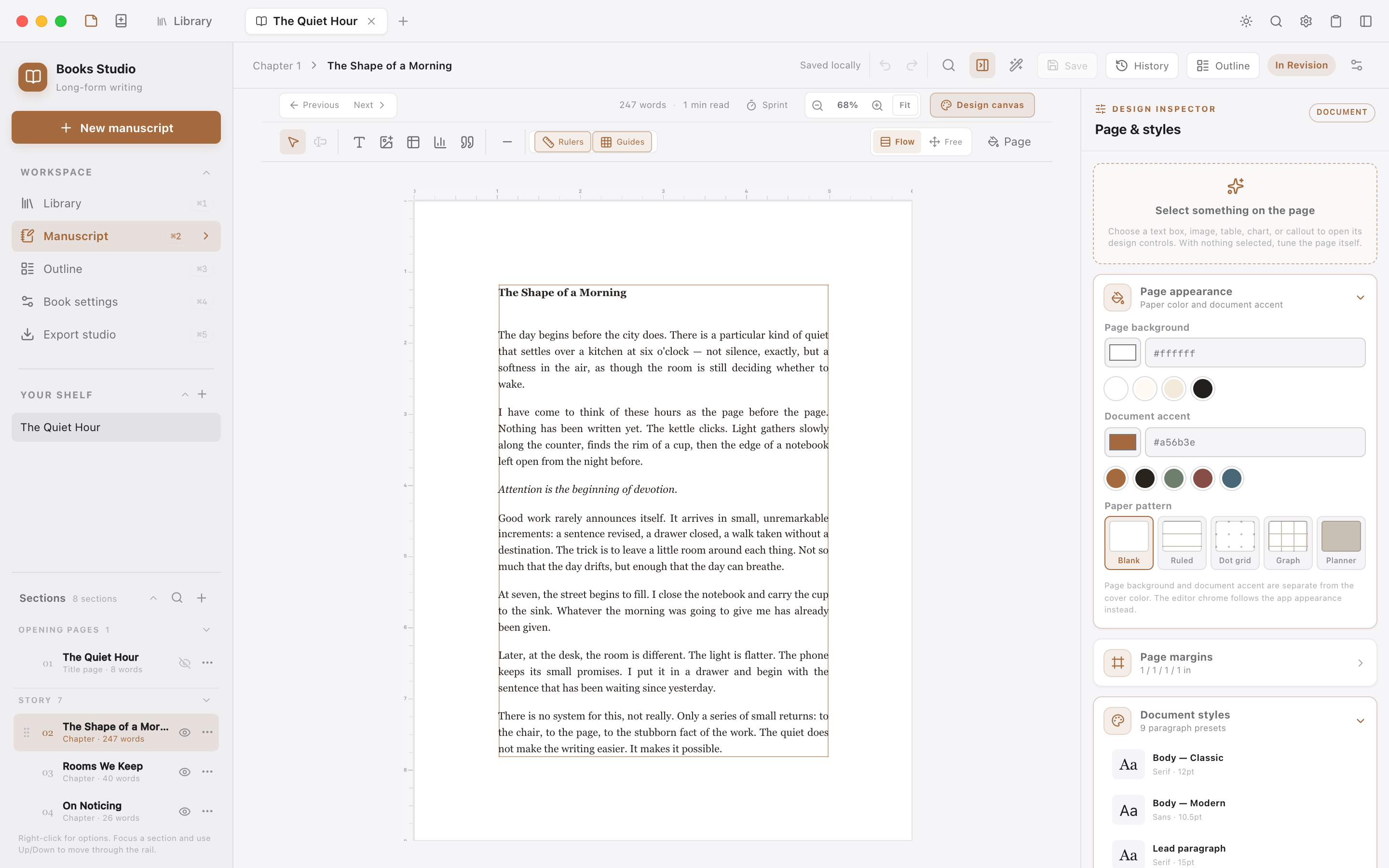
NoteMe Books Studio showing a manuscript canvas, section rail and design inspector.
NoteMe app icon.
ONE APP / TWO WORKSPACES

A quiet home for the thought and the manuscript.

Most writing tools force a choice between quick notes and serious long-form work. NoteMe keeps both in one native desktop app, with separate workspaces that stay out of each other’s way.

01 / NOTES

Capture the thought before it leaves.

A fast Markdown workspace with rich text, tabs, categories, tags, tasks and local attachments.

  • Markdown edit, split and preview modes
  • Rich text with headings, lists, quotes, code and links
  • Browser-style tabs, favorites, tasks, archive and trash
  • Color-coded categories and tags with live counts
  • Quick Capture, clipboard history and daily templates
  • Full-text search and a command palette for everything
NoteMe notes workspace with tabs, categories, a rich text note and the document inspector.
02 / BOOKS STUDIO

Write the book, then design the page.

Books Studio adds a direct-manipulation canvas for manuscripts, with typography, page geometry, artwork and publishing tools in the same app.

  • Structured front matter, chapters, interludes and back matter
  • Flow and Free layouts with a real design canvas
  • Typography, margins, running heads and page numbering
  • Tables, charts, callouts and recolorable book artwork
  • Automatic local saves, version checkpoints and focus mode
  • EPUB 3, DOCX, HTML, Markdown and print-ready PDF export
NoteMe Books Studio showing a manuscript canvas, section rail and design inspector.
03 / WHY NOTEME

Built for depth without the noise.

A private local core, a fast notes workspace and a real design surface for long-form writing.

01 / PRIVACY

Private by default.

Notes live in a local SQLite database. Attachments stay on disk. No account, telemetry or required sync.

02 / PORTABILITY

Markdown you can keep.

Notes remain portable plain text, whether you write in Markdown, rich text or the design canvas.

03 / SPEED

Fast enough to disappear.

Keyboard-first navigation, instant search, browser-style tabs and a command palette keep the interface out of the way.

04 / WRITING

A real writing studio.

Books Studio handles structure, page design, artwork and reader-ready export without leaving the manuscript.

05 / DESKTOP

At home on the desktop.

Native menus, window state, global Quick Capture and system themes in a Tauri 2 shell.

06 / OPEN SOURCE

Open source, MIT licensed.

The code is public, the data model is documented and the app is built to be inspected.

04 / LOCAL-FIRST

Your work stays on your machine.

NoteMe uses SQLite with WAL journaling. The only network request is the update checker when you explicitly ask for it.

No account. No tracking. No required cloud.

05 / KEYBOARD

Made for the keyboard.

The everyday actions stay one shortcut away.

⌘ KCommand palette
⌘ ⇧ NGlobal Quick Capture
⌘ ⇧ VClipboard history
⌘ TNew tab
⌘ FFind in section
⌘ ,Preferences
06 / OPEN SOURCE

Inspect it. Build it. Own your copy.

NoteMe is MIT licensed. Read the architecture, build from source with Tauri and Rust, or download the latest macOS release from GitHub.

Tauri 2RustReact 18SQLiteMarkdownMIT
NOTEME

Think clearly. Write deeply.
Keep it local.

Download NoteMe for macOS, or build it from source on Windows and Linux.